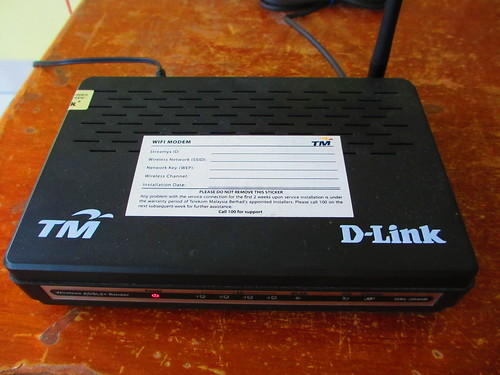
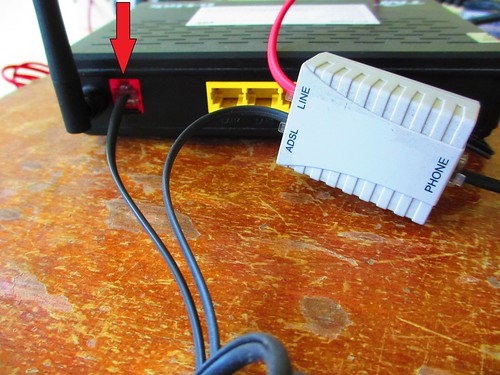
Many people having this problem and they always complain why their computer and modem always strike by lightning although they had switch off and pull out their modem power adapter.
Here are the steps: Always pull out the phone line from the modem(red arrow shown), switch off and pull out modem power adapter when not in use or when is raining.
4.Type your Streamyx ID and Streamyx Password provided by TM
Example: Streamyx ID: your streamyx login id@streamyx
Streamyx Password: your streamyx password
5.Set the Protocol to PPPoE and Connection Type to LLC and click Next
6.Put your prefered Wireless Network Name and WEP Key
Wireless network name(SSID): The network name you like to appear publicly
Network Key(WEP):
Choose 13 digits that you can remember and saved it in other places just
in case you forget and wanted to set up another wireless connection on
other pc.
Finally, TM is setting up the telephone cable. But how long will they take to set up everything and how long do I need to wait before I can subscribe Streamyx?
Sunday, April 10, 2011
Internet in Malaysia and US
Average download speed in US
Download speed in US rural area
This is what I get yesterday night.
Upload speed unable to connect until test error appeared
This morning result. Back to normal but compare to average US in rural area, Malaysia way behind in terms of providing service to the rakyat.
Unable to surf net whole night
Saturday, December 11, 2010
How to Connect to Streamyx Wireless using Vertex Wireless
1.Key in SSID to name your Wireless Network Connection.
2. Key in Wireless Code to protect your network from being hacked or use by others.
3. Finally click Apply.
3. To check wireless reception, go to Advance Setup->Status->Status Information.
RF below -75 means best reception
Streamyx Wireless Part 2
At last is here....the first in Taiping....somebody told me this is new stuff from TM. Previous modem and Wireless Streamyx quite unstable. I guess many will be using it in new housing area (those are without telephone cable installed). Now waiting for Wireless Phone. Speed min.384kbps(unlimited) better than Celcom, Maxis and Digi. Why? They are using TM cable.
If your area do not have cable, you need to apply for wireless telephone, fax and Streamyx but only at 384kps. For Wireless Streamyx, there are two packages offered which are RM60 and RM77. Contact this number for those interested(Perak).
Friday, December 03, 2010
Only For Malaysians
For those who haven't apply streamyx under 1malaysia plan, try applying for 1 mbps where you can get free netbook/ notebook depends on the terms and condition. If your salary is above RM2000, register under the name of your next of kin who is not working.
Sunday, April 11, 2010
CHANGING YOUR INTERNET SERVICE?
Between Maxis and Streamyx, which one will you choose? If you are a Streamyx user, will you change to Maxis? The question is which broadband will not be congested or disconnected during peak hours?
Bought a new Acer Aspire 4736G notebook loaded with Windows 7 Home Premium early this year.
Wanted to buy a Lenovo but it seems like Lenovo came up with Windows Vista upgraded to Windows 7. I heard a lot of people complaining during upgrading Windows Vista to Windows 7. Most of them had no problem making a clean installation to Windows 7 but not upgrading. Because Lenovo not competitive enough in pricing and specification, so I end up with Acer, cheap and better specifications.
Today's blog is not about notebook, who is better or etc. It is more on streamyx. I had been using streamyx for more than 4 years. I started using it since 2001 till 2003(while studying) and later in 2007 until now (working). What happened between year 2004-2006(menopause or mid-life crisis?)? Well I am working in east of Peninsular of Malaysia. It is quite remote and I depend only on cyber cafe(you will not like a remote cyber cafe). Dirty and snail internet connection. So I gave up on internet and concentrate more on work. I do miss internet so much that I lost touch on how to surf the net and started all over again in year 2007. Get into blogging in 2008 until now I found this is the platform to share information with you.
Towards the end of 2007, I had subscribed Streamyx 1.0Mps package for RM 77 for 2 years in additional payment of RM 26 for telephone rental. After the 2 years contract I had to pay for RM 88 plus RM 26. The monthly sum of payment to TM = RM 114. No reminder from TM to customers that their contract is about to end. So I end up paying more than I expected. If TM wanted to retain their existing customers, TM should come up with special deals and not only for new unsubscribe customers out there. So I look over 'Super Upgrade Deals for Combo or Standard Packages' and 'Combo Package'. All I want is to retain my existing package by paying less(I feel that Malaysians can get better deals and package for this not up to par internet connections) . I cannot get Super Duper Deals from 'Super Upgrade Deals' so I have to give it a try with 'Combo Package'.
With my existing contract RM 88(with modem),
I had changed to Combo package plus Free WiFi modem without any extra charges and I only had to pay for RM 110 monthly compare to RM 114.
With a few clicks, WiFi modem are ready to be used.
This modem's installation kit is compatible only on Windows XP and not Windows 7. Steps for installation :
Wireless network name(SSID): The network name you like to appear publicly
Enable Security
Network Key(WEP): Choose 13 digits that you can remember and saved it in other places just in case you forget and wanted to set up another wireless connection on other pc.
Hope you grab this opportunity to get a free WiFi modem if you haven't got any wireless all-in-one modem.
Friday, September 11, 2009
TO RESET AZTECH ROUTER
An email to Aztech Support Team:
Subject: Unable to connect to internet using wireless Broadband router Aztech WL830RT4
I had tried the following Quick Setup steps below:
Step 1: Open a browser.
Step 2: Enter 192.168.1.1 and then press Enter. This opens the login
window.
Step 3: Enter the User Name and Password and then press Enter. The
default User Name and Password is admin. This opens the Web Manager.
However when I tried to enter the username and password with admin it
didn't work. Try lot of times but the login window keeps popping up
asking for username and password. If I reset it, will it solve my
problem? How do I know I am successful in resetting the router? Please
help. Thanks in advance. The picture which I had attached shows the
problem I faced.
A reply from Aztech Support Team:
Dear Valued Customer,
Thank you for your email.
Yes, the default username/password is: admin.
Should that failed, reset is required.
To reset:
1. Power off the router.
2. Press and hold the reset button (with paper clip or something that
can fit the reset hole).
3. While holding the reset button, power on the router.
4. Keep holding the reset button for 7 seconds, then release the reset button. Wait for 1 minute.
5. Try access to http://192.168.1.1 again.
Note: all settings will be erased / back to manufacture default.
Yours sincerely,
Support Team
AZ-Technology Sdn Bhd 901, 9th Floor, Block B,
Kelana Business Centre,
97, Jalan SS7/2, Kelana Jaya,
47301 Petaling Jaya, Selangor.
Tel: 03-7804-8450
Fax: 03-7804-8457