Showing posts with label Laptop. Show all posts

Tuesday, August 23, 2016

Saturday, October 13, 2012

How To Prevent Your Computer And Modem From Being Strike by Lightning


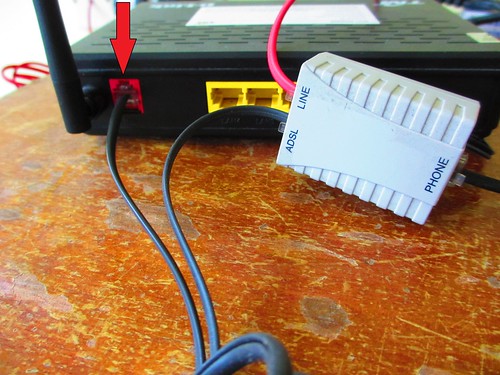
Many people having this problem and they always complain why their computer and modem always strike by lightning although they had switch off and pull out their modem power adapter.
Here are the steps: Always pull out the phone line from the modem(red arrow shown), switch off and pull out modem power adapter when not in use or when is raining.
IMG_2290 IMG_2292
How to choose or buy a modem (with router)
Ask the shop for advise and their recommendation.

Thursday, March 08, 2012

Saturday, March 03, 2012

Windows 8 Consumer Preview


During its development, Windows 8 has gone through different stages. The current stage is Consumer Prieview which is a beta stage (Febuary 29, 2012).
The next stages include Release Candidate (April 2012) and RTM (which if production stays on track is said to be released in August 2012).

Microsoft info link:
 http://windows.microsoft.com/en-US/windows-8/iso

http://live.theverge.com/Event/Microsofts_Windows_8_Consumer_Preview_event_at_MWC_2012?Page=0

Download link
x64bit :
http://iso.esd.microsoft.com/WCPDL/BD1B8A49393E30CC9C4E5C88457D73E964F1F3B18/Windows8-ConsumerPreview-64bit-English.iso

x32bit :
http://iso.esd.microsoft.com/WCPDL/BD1B8A49393E30CC9C4E5C88457D73E964F1F3B18/Windows8-ConsumerPreview-32bit-English.iso

Tuesday, January 03, 2012

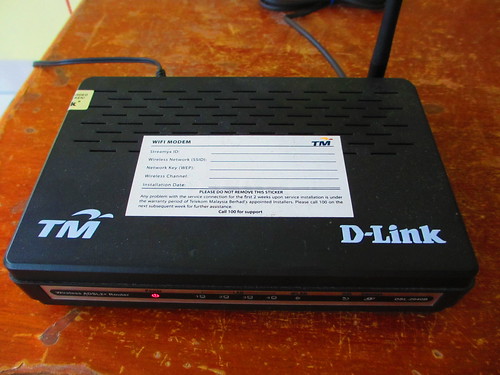
How to Connect to Streamyx Wifi D-Link Wireless ADSL 2+ Router (DSL-2640B)


If you subscribe for 1 mbps, 2 mbps or 4 mbps, there will be free local calls nationwide. Installation fees is only RM30.
This is provided free
Steps for installation :
1.Open any internet browser and type http://192.168.1.1
2.Type Username: tmadmin and Password: tmadmin
 3.Go to SETUP->Setup Wizard
 4.Type your Streamyx ID and Streamyx Password provided by TM
Example: Streamyx ID: your streamyx login id@streamyx
   Streamyx Password: your streamyx password
5.Set the Protocol to PPPoE and Connection Type to LLC and click Next
 6.Put your prefered Wireless Network Name and WEP Key
Wireless network name(SSID): The network name you like to appear publicly
 Network Key(WEP): Choose 13 digits that you can remember and saved it in other places just in case you forget and wanted to set up another wireless connection on other pc.

Saturday, November 26, 2011

Sunday, November 13, 2011

Computer Tips
superantispyware portable-Check and remove malware on infected PC without updating
https://www.superantispyware.com/portablescanner.html

Friday, October 28, 2011

How fast is your PC??? Take this test to find out more ...
Internet Explorer 9 Demo
www.howfastismypc.com

Friday, October 07, 2011

Masalah Acer dalam Sleep Mode
mohon bantuan.......sy mnggunakan laptop acer aspire 4540 belum sampai 2 tahun..timbul masalah susah nk on..bila tekan butang on...lampu pd butang on menyala tapi skrin tetap hitam x tunjuk apa2..bios pon x kuar...sy terpaksa on/off berkali2..kadang2 hampir 1 jam baru dapat on...yang peliknya bila dapat on, ia berfungsi dengan normal...dan boleh di guna seperti biasa....tapi x boleh bg 'sleep' mode..kalau bg 'sleep' mode konfem xdpt bukak (sbb sindrom lampu pd butang on menyala tapi skrin hitam x tunjuk apa2 berulang)....1 lg..batteri laptop sy dh hampir 2 bulan rosak..xdpt charge...kwn sy bgthu lbih bgus sambung trus dgn kabel charger n bukak battery yg dh rosak tu...tp sy ttp guna battery tu (sambil sambung plug charger stiap kali on laptop)...

soalan sy: [1]apa sbnarnya mslh laptop sy nih..[2]battery tu ada memberi kesan jugak ker dgn pnyakit laptop sy?

Penyelesaian:
I think there is nothing wrong with your laptop battery. Saya pun sedang guna laptop acer Windows 7. Tiada apa-apa masalah dalam dua tahun ini. Masalah yang timbul disini bila saya menutup lid atau dalam start button saya klik ke sleep. Memang laptop itu seolah-olah tidur tetapi tidak respon apabila cuba hidupkannya semula. Sila tukar properties Control Panel->Hardware and Sound->Power Options->Edit Plan Settings
Merujuk kepada gambar http://imageshack.us/photo/my-images/262/powerplan.jpg/
Dari situ, sila ke 'Put the computer to sleep' dan tukar kepada 'never' untuk kedua-duanya. Harap berjaya!
 ERROR PAGE IN FIREFOX
If you come to an error page in firefox, this is the image firefox will display

Sunday, October 02, 2011

TM 1MALAYSIA NETBOOK

Preload with Windows 7 starter but no Microsoft Office

Sunday, September 18, 2011

When getting a new notebook Asus K43S Series
Things to do:

 Make sure charge it for 8-12 hours
1. Check installation of microsoft office
2. Back up windows os in dvd
-driver and application
-3 dvd for back up
-win 7 repair disk
3. Rerun assessment in My Properties
4. Installation of:
-adobe reader
-Mozilla Firefox(and add on)
-Internet Explorer
-Malwarebytes
-Antivirus
-Quicktime
-Windows Live
-7-zip
-CCleaner
-PDF input and output
-USB Vaccine
-Codec
-NetSetMan
-Google Earth
-Java
-Printer driver
5. Update everything just installed

Saturday, September 03, 2011

Friday, August 26, 2011

 Traffic information on the PLUS highways
Contact PLUSline at 1800-88-0000 and its Twitter: https://twitter.com/#!/plustrafik

Wednesday, August 17, 2011

Files in external hardisk becomes shortcut after infected with virus
Follow the steps here and here.
1. This is the infected external which turned all files into shortcut. Before following the steps above, make sure you had removed all the viruses using anti-malware and anti-virus.
2. Make sure in the Security Tab, all permissions had been changed to allowed
 3. This screenshot is one of the example to extract the files from hidden and shortcut.
4. Some of the files successfully retrieved but long way to go as it need to be retrieved one by one.
 5. Put symbol * for files which had more that one word.

Tuesday, August 09, 2011

Problem Installing Ken-A-Vision T-1754 Digital Monocular Microscope
I am having problem installing Ken-A-Vision Digital Microscope
(Picture of the Digital Microscope: http://ken-a-vision.com/microscopes/t-1754)
Lost the CD installer so I had downloaded three software but still unable to install. Why is it?
Software downloaded and installed:AV3Setup, av4 and cp3221xv
There is a error pop up message saying "No Camera Detected..."
If there's insufficient software that I need to install, please provide me the link. By the way, I am using Windows XP.

At last successfully installed with the help online from team Ken-A-Vision
T-1252 microscope, so this is an older USB 1.1 model; it should still work fine under Windows XP.  However you will need to have the correct drivers installed, and it will not work with Applied Vision 4, only Applied Vision 3 (or 2).
Here is Applied Vision 3, the camera application:
http://store.kenavision.com/download/AV3Setup.exe
Here is the camera driver installer:
http://www.kenavision.com/cp3221xv.exe

Sunday, August 07, 2011

Run another operating system but did not want to install anything
Windows XP, Microsoft Office, Ubuntu 6 and Ubuntu 8
http://us.jpc2.com/home.html

Admin

Welcome back. Please do make a comment and vote. My comment is just personal opinion.